Picoflow And LangGraph Architecture Contrast
Executive Summary
Picoflow is a turn-based agentic flow framework built around
Flow, Step, persistent session documents,
and a recursive LLM/tool execution loop. It uses LangChain message,
model, and tool abstractions, but Picoflow itself owns orchestration.
The active step is stored in session state, each step owns
prompt/tool/state behavior, and transitions happen through TypeScript
code that calls or returns the next step.
LangGraph is a graph runtime. Its core model is a compiled
StateGraph made of explicit state channels, nodes, and
edges. Nodes perform work and return state updates; edges, conditional
edges, Send, or Command determine what
executes next. The graph runtime checkpoints state at super-step
boundaries and can expose state history, pending tasks, interrupts,
and time travel.
The most important difference is this:
-
Picoflow transitions are code-first. A step handler
can return
DOBStep,{ step: EndStep, state: ... }, callflow.activate(...), or delegate to another step. There is no edge table or graph compiler that owns routing. -
LangGraph transitions are graph-first. Routing is
represented in the graph definition through edges, conditional
edges,
Send, andCommand, and the compiled graph runtime owns scheduling.
Picoflow is therefore closer to a persistent, step-oriented, tool-calling state machine agent. LangGraph is closer to a general-purpose durable graph runtime for stateful agents and workflows.
Picoflow Architecture
Runtime Entry Point
The NestJS ChatController registers flows such as
BasicFlow, HotelFlow,
InvoiceFlow, and TravelFlow, then exposes
POST /ai/run. Requests contain:
flowNameuserMessage- optional
config - optional
CHAT_SESSION_IDheader
FlowEngine.runFlow(...) creates or restores the selected
flow through FlowCreator.create(...), invokes
flow.run(...), then saves the updated session document.
Flow
Flow is the owner of a flow instance. It holds:
stepMap: registeredStepobjects-
tools: composed LangChainDynamicStructuredToolwrappers sessionDoc: durable session document-
flowDoc: this flow's section inside the session document memory: namespaced message historiescontext: runtime config and custom flow context- model defaults and model parameter overrides
Each concrete flow overrides defineSteps() and returns
instantiated steps. A step constructor argument marks the initially
active step. On bootstrap, Picoflow restores the persisted session,
rehydrates step states and memories, and records the active step
sequence.
There is no declarative transition graph.
Flow.activate(...) and
Flow.activateByName(...) simply deactivate the prior
active step, activate the target step, and append that step name to
flowDoc.sequence.
Step
Step is the local execution unit. A step can define:
- prompt generation through
getPrompt() -
available tools through
defineTool()andgetTool() - tool handlers as methods named after tool names
- persistent state through
saveState(...) - transient state through
saveState(..., true) - memory namespace through
useMemory(...) -
model override through
useModel(...)anduseModelParams(...) -
cross-step entry behavior through
onCrossing(...) -
response rewriting or transition behavior through
onResponse(...) - structured output through
structOutputSchema()
When Step.run(userMessage) executes, it creates a
LangChain human message and delegates to
LlmRunner.send(...). The active step's memory is used as
the model history, with the step prompt placed at index
0 as a system message.
Model Configuration
Picoflow supports model configuration at multiple levels:
-
Global registry level:
FlowEngineowns aModelRegistryand registers the default model catalog throughcreatePopularModels(). The app can also register or replace models withregisterModel(...)andregisterModels(...). -
Flow level: a flow can set its default model with
useModel(...)and flow-level parameter overrides withuseModelParams(...). -
Step/state level: an individual step can override
the flow default with its own
useModel(...)anduseModelParams(...).
LlmRunner resolves the effective model at execution time.
If a step does not specify a model, bootstrap assigns the flow
default. When the active step runs, Picoflow merges flow-level
parameters with step-level parameters when the step is using the flow
model; if the step selects a different model, only the step's own
overrides are applied. This gives a flow a global default while still
allowing a specific state to use a stronger, cheaper, multimodal, or
differently parameterized model.
BasicFlow demonstrates this layering with a flow default
of gpt-4o, while InContextStep overrides to
gpt-5.1 with reasoning parameters.
InvoiceFlow uses a Gemini default, gives
ExtractInvoice3Step a specific Gemini model and
temperature override, and gives EndStep another model.
Step State
Each step has a JSON-like state object. State is saved
into the session document and restored on later turns. A step can read
its own state through getState(...) or
getStateAs(...), and other steps can access it through
flow helpers such as getStepState(...) and
getStepStateAs(...). This makes step state both local to
the state that owns it and available to other states when the flow
needs cross-step data.
Tool handlers and logic steps can also inject state into a target step
by returning { step, state }. That is how routing and
data passing often travel together in Picoflow.
Picoflow also supports transient state through
saveState(json, true). Transient state is available
during recursive calls inside the same turn, so it can pass data from
one state to another during a nested LLM/tool/logic execution. It is
deliberately removed before persistence in
Step.writeDoc(...), so it does not survive into the saved
session document.
LLM And Tool Loop
LlmRunner implements the agent loop:
- Resolve active step and effective model settings.
-
Handle cross-step message rebasing via
onCrossing(...). -
If the active step is a logic step, delegate to
LogicRunner. - Build the model instance.
- Bind the active step's tools.
- Optionally enable structured output.
- Invoke the model with the step's message history.
- Retry on empty non-tool responses.
- Process either plain model output or tool calls.
If the model returns tool calls, Picoflow executes matching step methods. A tool handler can return several control shapes:
- a string step name
- a step class such as
DOBStep -
an object such as
{ step, prompt, state, contentType, tool, message }
That return value can activate a new step, inject state, replace a
prompt, change HTTP content type, add a tool result, or add a direct
AI/human message to memory. After tool execution, Picoflow either
returns directly or recursively re-enters
LlmRunner.send(...).
This is the core agentic loop: model chooses tools, TypeScript executes tools, tool code can mutate state and route to another step, and the model continues from the new active step.
Result Capture And Direct Responses
Picoflow supports two primary ways for a step to capture model results:
-
Tool-call result capture: the step defines a tool
schema, the LLM calls that tool, and the matching step method
receives the structured arguments. Examples include
capture_jsoninInvoiceFlow,capture_choicesinHotelFlow, and ordinary collection tools such asuser_name,dob, oraddressinBasicFlow. -
Structured schema result capture: the step returns
a schema from
structOutputSchema(), andLlmRunnerapplieswithStructuredOutput(...)to the model.InContextStepdemonstrates this by requesting a structured sci-fi movie object with fields such astitle,genre,releaseYear,rating, andsummary.
Tool-call capture is useful when the model should submit a domain event or action into the flow. Structured schema capture is useful when the whole model response should conform to a schema without routing through a named tool handler.
Picoflow can also short-circuit the normal second LLM call after tool
execution. By default, after a tool call, the framework records tool
results and usually re-enters the model so the LLM can explain or
continue. But if a tool handler returns an AI message with
additional_kwargs.direct = true,
LlmRunner appends that message and returns it
immediately.
CompareStep.generate_comparison(...) shows this pattern.
The first LLM call selects the comparison intent and calls
generate_comparison; the tool handler fetches hotel data,
generates a comparison chart in code, and returns a direct AI message
containing the chart and follow-up question. Picoflow then avoids a
second LLM call, which is useful when the deterministic tool result is
already the exact response that should be shown to the user.
Logic Steps
LogicStep is a non-LLM step. Its
runLogic() returns a LogicResponseType that
can route to another step and inject state.
LogicRunner can chain multiple logic steps before
returning to an LLM-backed step.
In BasicFlow, FooLogicStep routes to
GooLogicStep with { fooData: 'fooValue' },
then GooLogicStep routes to
FavoritesStep with { gooData: 'gooValue' }.
This shows deterministic, code-only routing inside the same step
framework.
Memory And Session Persistence
Picoflow persists a full SessionType document. A session
includes:
- session id, status, timestamps, expiration, and token counters
- one or more flow documents
- each flow's memory namespaces
- each flow's steps and step state
- the transition sequence
- logs, errors, warnings, debug, and verbose records
Memory serializes and rehydrates LangChain messages
across named namespaces. Steps can share memory, as
NameStep, DOBStep, and
AddressStep do with default, or isolate
memory, as PresidentStep does with
president and FavoritesStep does with
favorite.
Persistence is selected by CoreConfig.documentDB:
MONGOusesMongoSessionCOSMOusesCosmoSessionSQLITEusesSQLiteSession
All three adapters implement the same
SessionAdaptor interface: fetch,
fetchAll, restore, create,
save, and delete. SQLite stores the session
as JSON in a session table and uses WAL mode. MongoDB and
Cosmos DB store the session document directly.
Completed or aborted sessions are not resumed by
fetch(...); Picoflow creates a new session instead.
BasicFlow As Feature Demonstration
BasicFlow is the project's feature tour.
It demonstrates:
- turn-based chatbot flow execution
- step-specific prompts and tools
- result capture through tool calls or structured schema output
- step transitions through returned classes and objects
- shared memory with
useMemory('default') -
isolated memories with
president,favorite,separate, andtemp -
logic-only transitions with
FooLogicStepandGooLogicStep -
cross-step entry customization through
onCrossing(...) - step state persistence with
saveState(...) - transient state with
saveState(..., true) - global, flow-level, and per-step model configuration
-
model defaults with flow-level
useModel('gpt-4o') -
per-step model overrides such as
InContextStepusinggpt-5.1and reasoning parameters -
cross-step state access through
getStepState(...)andgetStepStateAs(...) - sub-step execution with
runStep(InContextStep) -
nested concurrent sub-step execution with
runSteps(...) -
tool validation loops, such as rejecting
John Doeor invalid addresses - end-chat behavior through
EndStep -
concurrent batch behavior through
config._concurrent
The normal chat path begins at WeatherStep unless
config.isPresident is true.
WeatherStep accepts only LA and
NYC; once both have been captured, it routes into logic
steps and then into the rest of the flow.
The batch path is activated by config._concurrent.
Flow.run(...) detects that flag and calls
spawnSteps() instead of the normal active-step path.
BasicFlow.spawnSteps() activates
PresidentStep, then calls
concurrentSteps(...) over a list of ordinal presidents.
Each item is sent back through the app using SelfClient,
with per-item config such as
{ nth: '10th', isPresident: true }. Responses are saved
into PresidentStep state and the session is completed.
This batch design is Picoflow's framework-level parallel processing construct. It is not graph fan-out; it is concurrent orchestration implemented by a flow coordinator that spawns independent flow runs through HTTP and aggregates their results.
The public
basic-flow demo source
also demonstrates a newer step-level concurrent fan-out path.
NameStep still calls
runStep(InContextStep) to execute one nested step in
context. Inside InContextStep.onEnter(), however, the
step calls runSteps(...) with
ConcurStep1 and ConcurStep2. The base
Step.runSteps(...) implementation creates one nested
activation per request and awaits them with Promise.all,
so a step can fan out to multiple concurrent child steps and then
save their returned results back into its own state.
InvoiceFlow As Non-Chatbot Application
InvoiceFlow shows that Picoflow is not limited to chatbot
questionnaires.
The flow is a document extraction pipeline. Its active step,
ExtractInvoice3Step, uses a Gemini model, constructs a
prompt from config.fileName, asks the model to fetch an
invoice image, uploads the local file through
LLMFileManager, and then captures extracted JSON through
a capture_json tool.
When JSON is captured:
- the step saves it to state
- sets
contentTypeto JSON - returns a direct AI message
- transitions to
EndStep
The HTTP layer then returns the model result with JSON content type rather than a plain chat response.
InvoiceFlow also has a _concurrent path. Its
spawnSteps() processes invoice image names through
concurrentSteps(...), again using Picoflow's own parallel
flow pattern rather than a graph-native map/reduce scheduler.
LangGraph Architecture Baseline
LangGraph models workflows as graphs with three primary concepts:
- State: shared data channels, usually declared with a schema.
- Nodes: functions that receive state, perform work, and return partial state updates.
- Edges: routing functions or fixed transitions that decide which node runs next.
A LangGraph application is usually built by creating a
StateGraph, adding nodes and edges, then compiling the
graph. Compilation performs structural checks and attaches runtime
capabilities such as checkpointers and breakpoints.
LangGraph state channels can use reducers. For example, a messages channel uses a message-aware reducer so new messages append or update by id instead of replacing the whole message list. Other state fields can use default overwrite behavior, custom reducers, or untracked values that are available during execution but excluded from checkpoints.
LangGraph persistence is based on:
- checkpointers for thread-scoped graph state snapshots
- stores for long-term, cross-thread application memory
With a checkpointer, graph state is saved against a
thread_id. Checkpoints are created at graph super-step
boundaries. LangGraph can retrieve the latest state, inspect
historical state, resume from checkpoints, support fault tolerance,
and enable time travel.
LangGraph also supports:
- normal edges
- conditional edges
- conditional entry points
- dynamic fan-out through
Send - node-level routing and updates through
Command - interrupts and resume
- subgraphs
- event streaming
- node caching
- LangSmith tracing and observability
Direct Comparison
| Area | Picoflow | LangGraph |
|---|---|---|
| Primary abstraction |
Flow containing active Step objects
|
Compiled StateGraph |
| Routing model | Code returns or activates the next step |
Edges, conditional edges, Send, or
Command
|
| Transition representation |
Runtime mutation of isActive plus
sequence history
|
Graph topology plus runtime scheduled next nodes |
| State model | Session document with flow memory, per-step JSON state, transient state, context, logs, tokens | Schema-defined graph state channels with reducers |
| Memory model | Namespaced LangChain message histories per flow/step | Message channels in graph state plus checkpointer/store memory |
| Model configuration | Global model registry plus flow-level and step-level model/parameter overrides | Usually configured inside nodes, model factories, or runtime config |
| Persistence | MongoDB, Cosmos DB, or SQLite session document as a rich durable flow snapshot with a document version field; checkpoint-style replay is possible when historical session snapshots are retained | Checkpointers for thread state and stores for cross-thread memory |
| Observability and production debugging | Session document includes step memories, execution sequence, step states, token counters, and built-in log/error/warn/debug/verbose reports | LangSmith provides rich external tracing and observability when enabled |
| Deployment and data boundary | Self-contained NodeJS service instances can be clustered inside a company firewall with company-owned session storage | LangGraph can run self-hosted; LangSmith Cloud observability sends traces/data to LangChain-hosted infrastructure unless disabled or replaced with self-hosted LangSmith |
| Execution style | Turn-based active step loop | Graph super-step scheduler |
| Tool behavior | Step methods handle tools and can route directly |
Tools usually update state and may route with
Command
|
| Result capture | Tool-call arguments or step-level structured schema output; direct AI messages can short-circuit a second LLM call | Node output updates graph state; structured output/tool use is usually implemented inside node logic |
| Parallelism |
Built-in _concurrent flow mode and
concurrentSteps(...) for batch/parallel flow
execution
|
Graph-level parallel node execution and dynamic
Send fan-out
|
| Non-LLM logic | LogicStep and LogicRunner |
Any node can be pure code |
| Compile-time validation | Minimal; flow steps are collected at runtime | Graph compilation checks structure |
| Visualization | Sequence can be inspected from session; Mermaid docs exist separately | Graph topology is explicit and visualizable |
| Human-in-loop | Native to the turn-based request/response contract; the active step waits for the next human turn without a special interrupt construct | First-class interrupts, resume, and checkpoint inspection |
| Time travel and dev replay | Possible by copying a production session document into dev, rolling back memory JSON, setting an earlier active step/state, and reexecuting the flow; historical copies provide checkpoint-style time travel | Built into checkpoint history model |
| Best fit | Context-enriched conversational agents and purposeful turn-based applications | Graph-shaped task workflows needing scheduling, inspection, replay, and branching |
Key Architectural Difference: No Edges In Picoflow
Picoflow does not ask the developer to write:
graph.addEdge("NameStep", "DOBStep");
graph.addConditionalEdges("WeatherStep", route);
Instead, a Picoflow step contains routing inside ordinary code:
protected async dob(tool: ToolCall): Promise<ToolResponseType> {
  this.saveState({
    year: tool.args?.year,
    month: tool.args?.month,
    day: tool.args?.day,
  });
  return AddressStep;
}
Or:
protected async address(tool: ToolCall): Promise<ToolResponseType> {
  const response = ValidateAddress(tool.args?.address);
  if (!response) {
    return {
      step: AddressStep,
      tool: 'Invalid address',
    };
  }

  this.saveState({ address: response });
  return {
    step: EndStep,
    prompt: DemoPrompt.AbruptEnd,
    state: { fromAddress: 5 },
  };
}
This makes transitions local, imperative, and close to business validation. The tradeoff is that the flow topology is not fully declared in one place. To understand all possible routes, a developer must read the step code and tool handlers.
LangGraph makes the opposite tradeoff. Routing is explicit in the
graph builder, or explicitly returned as Command. This
improves graph-level visibility, static validation, visual inspection,
and generic runtime behavior. The tradeoff is that developers must
express routing through graph primitives even when the business rule
is naturally located inside a handler.
Human In The Loop
Picoflow's human-in-the-loop behavior is native to its turn-based design. A flow runs one turn, persists the session document, returns a response, and naturally waits for the next user message. If the active step still needs information, it remains active in the saved session. The next request resumes from that same active step with the same step state and memory.
That means a human pause is not exceptional control flow in Picoflow. It is the ordinary lifecycle of a chatbot or agentic application: ask, persist, wait, resume. A step can collect data over multiple human turns, validate a response, ask again, or transition only after the user supplies what the step needs.
LangGraph supports human-in-the-loop through interrupts and resume semantics. That is powerful for durable graph execution, especially when a graph would otherwise continue running and needs to stop at an explicit checkpoint for human input or approval. Picoflow does not need an equivalent interrupt primitive for normal conversational human-in-the-loop behavior because every turn boundary is already a durable pause point.
Persistence Difference
Picoflow stores the application session as the primary unit. The saved document contains flow state, step state, memories, logs, token counters, and status. The session document is readable as the application record of the interaction.
The session document also carries a version number. In
this codebase, new sessions are created with
version: K.version, which is currently 1.13.
That version identifies the session document/runtime format. It is
separate from historical snapshot retention for time travel.
Because the session document carries each step's persisted state, active flag, memory, flow context, and transition sequence, Picoflow can support time travel by resurrecting a prior session document, setting the active step/state to an earlier point, and reexecuting the flow from there. This is a session-document snapshot model: the durable application record is also the material needed to rewind, fork, or reproduce execution.
That makes Picoflow's session document checkpoint-like, but not
identical to LangGraph's checkpoint history by default. In the current
implementation, saveSession() writes the latest durable
flow state back to storage, so the normal session record is a rich
mutable snapshot of the flow. If the application retains historical
copies of that session document, those copies become checkpoint-style
replay points. Picoflow therefore captures the durable changes needed
for replay and debugging, while historical snapshot retention policy
determines whether the system has a built-in timeline of prior
snapshots.
A practical workflow is to take a production session document, copy it into a development database, set the active step to the state where debugging should begin, and roll back the relevant memory namespace by editing its JSON message history. Because memories are stored as ordinary arrays under named namespaces, shared histories and step-specific histories can be trimmed independently. The developer can also adjust step state or flow context in the same document before replaying the flow in dev.
One caveat is transient state. Picoflow's transient state is intentionally useful only during recursive calls in a single turn and is removed before persistence. The session document captures durable flow state, not every temporary in-memory value.
LangGraph stores graph state checkpoints as the primary unit. The checkpointer is optimized for resume, fault tolerance, checkpoint history, pending writes, and time travel. Long-term memory is separated into stores.
In practical terms:
- Picoflow persistence feels like an application session database and rich durable snapshot that can be resurrected for replay/time travel.
- LangGraph persistence feels like a durable execution log and state checkpoint system.
Observability And Production Debugging
Picoflow's session document is also an observability tool. For a production runtime problem, the saved session can show:
- shared or separated message history for each memory namespace
- the step execution sequence in
flowDoc.sequence - each step's active flag and persisted JSON state
- flow context and runtime config
- token counters
-
built-in
log,error,warn,debug, andverbosereports
SessionLogger writes structured entries directly into the
session document. Runtime warnings such as ignored model parameters,
missing tool handlers, hallucinated tools, batch errors, and aborted
sessions are therefore attached to the same durable record as the user
conversation, tool loop, state, and routing history.
This makes the session document useful for post-incident debugging. An operator can inspect what the user and model said, which step was active, which path the flow took, what each state contained, which warnings or errors were recorded, and then resurrect or modify the document to replay the problem from a chosen point.
That replay can happen outside production. Since the session document encapsulates the conversation, step histories, state JSON, flow context, logs, and execution sequence, it can be moved into a development environment without reconstructing the incident by hand. The developer can choose the starting point by changing which step is active, roll back or trim the memory JSON to the desired turn, and run the flow again against dev models, tools, or patched code.
LangGraph plus LangSmith offers richer external tracing, dashboards, and observability workflows. Picoflow's distinction is that the operational evidence is embedded in the application session document itself, so the debugging artifact can remain inside the same company-controlled database as the production session.
Deployment And Data Boundary
Picoflow can be deployed as a cluster of self-contained NodeJS service instances inside a company's firewall. The runtime can use company-controlled MongoDB, Cosmos DB, or SQLite storage for sessions, memory, state, logs, and replay data. In that deployment shape, the orchestration layer does not require an external observability or workflow cloud to run.
LangGraph itself can also run in a self-hosted application process. The data-boundary difference becomes important when LangGraph is paired with LangSmith Cloud for tracing, debugging, evaluation, and observability. LangSmith Cloud is a managed service hosted in LangChain's cloud environment, so traces and associated run data leave the company boundary unless tracing is disabled, redacted, or replaced with self-hosted LangSmith. LangSmith self-hosting exists, but it is an Enterprise deployment option rather than the default managed-cloud path.
For companies with strict firewall or data-residency requirements, Picoflow's default deployment model is simpler: run NodeJS instances and the selected session database inside the controlled network. LangGraph plus LangSmith can meet similar requirements only if the team avoids LangSmith Cloud or procures and operates the self-hosted LangSmith option.
Parallelism: Batch vs. Fan-Out
Picoflow's Two Concurrency Mechanisms
Picoflow has two separate concurrency mechanisms in the basic demo: flow-level batch concurrency for launching independent flow executions, and step-level nested fan-out for launching multiple child steps from within one active step. They are related, but they operate at different scopes and should be described separately.
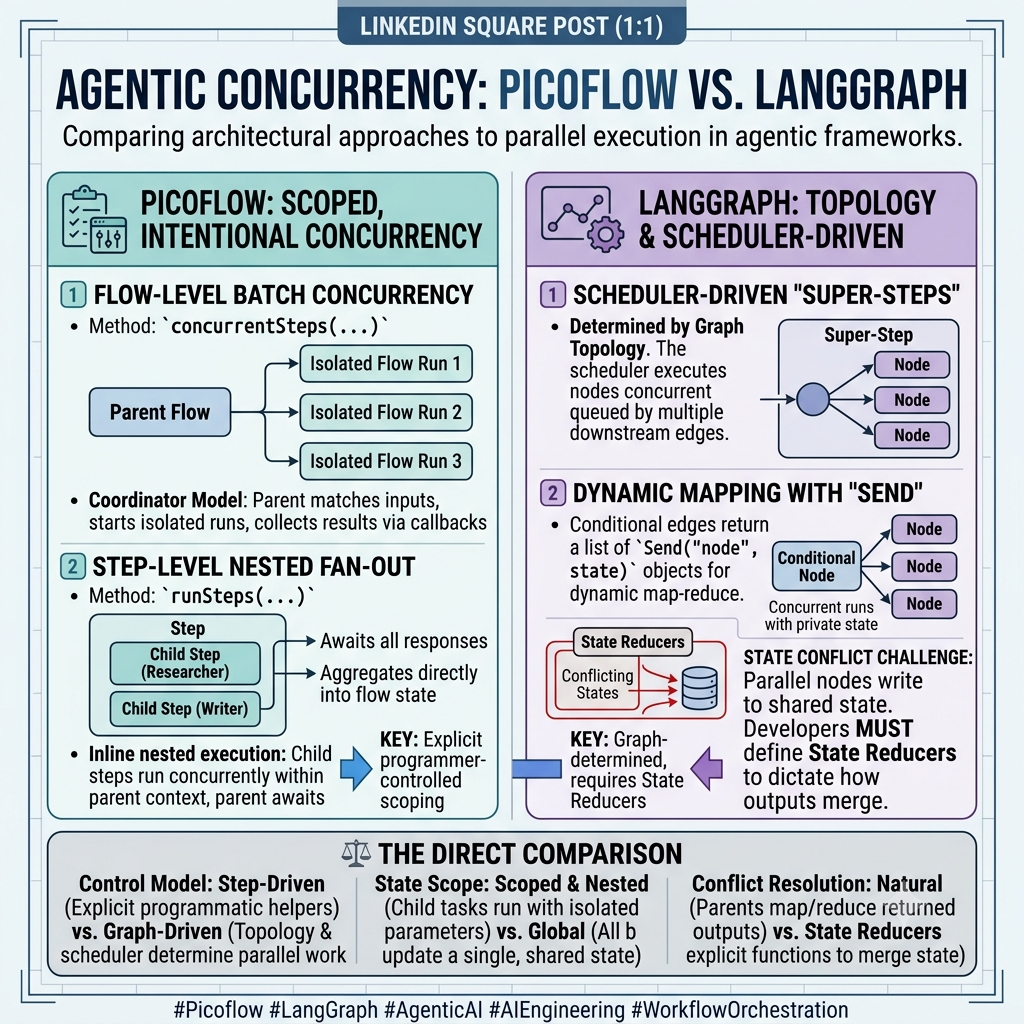
01 / BATCH
Run independent flows
concurrentSteps(...) coordinates isolated flow executions. Each item carries its own config, can be throttled, and returns a result to the parent.
02 / FAN-OUT
Parallelize inside a flow
runSteps(...) launches child steps from the current parent step and returns their responses for direct aggregation.
| Architectural question | PicoFlow | LangGraph |
|---|---|---|
| What starts parallel work? | Explicit helpers: concurrentSteps and runSteps. | Graph topology, outgoing edges, or dynamic Send fan-out. |
| Where does context live? | In the isolated flow run or active parent-step scope. | Across graph branches that can update graph state. |
| Who resolves the join? | The parent flow or step aggregates returned results in program logic. | Reducers may be needed when concurrent branches update the same state key. |
The decision is not “can it run in parallel?” It is: where should ownership of context, state, and results live?
Flow-Level Batch Concurrency
The first mechanism is Picoflow's _concurrent flow mode
and the underlying concurrentSteps(...) construct.
Flow.run(...) checks config._concurrent; if
true, it calls spawnSteps() instead of the normal
active-step path. concurrentSteps(...) batches items,
sends each item as an independent request to SELF_URL,
and lets each spawned flow run with its own config. The parent flow
collects responses through callbacks.
Step-Level Nested Fan-Out
The second mechanism is more local: concurrent fan-out inside a
running step. Step.runStep(...) runs one nested child
step under the current step's active context.
Step.runSteps(...) generalizes that pattern to multiple
child step requests, activates each nested step, runs it with its own
optional user message, and waits for all child results with
Promise.all.
In the
basic-flow demo,
InContextStep.onEnter() calls
runSteps([...]) to launch
ConcurStep1 and ConcurStep2 concurrently,
then stores both returned values with
saveState({ concurStep1, concurStep2 }).
ConcurStep2 further demonstrates that nested fan-out can
compose by calling runSteps(...) from its own
onEnter(). This is different from
_concurrent: it remains inside the current flow session
and current parent step context instead of spawning separate flow
requests through SelfClient.
LangGraph Graph-Level Parallelism
LangGraph parallelism is part of graph execution. Multiple outgoing
edges can schedule multiple destination nodes in the next super-step.
Send supports map-style dynamic fan-out where each
generated item can be sent to a downstream node with its own state.
So parallel processing is not unique to LangGraph. The difference is the control model:
-
Picoflow flow-level parallelism is coordinator parallelism: a flow
opts into
_concurrent, runsspawnSteps(), and usesconcurrentSteps(...)to launch multiple independent flow executions. -
Picoflow step-level parallelism is nested-step fan-out: a step calls
runSteps(...)to launch multiple child steps inside the current flow session and collect their results. -
LangGraph parallelism is graph-scheduler parallelism: parallel work
is expressed through graph topology, outgoing edges, or dynamic
Sendfan-out.
Developer Experience
Picoflow's style is natural when building a purposeful flow where each step maps to a domain interaction:
- collect a name
- validate an address
- upload an invoice
- capture structured JSON
- route to an end step
The code for prompt, tools, validation, state update, and routing lives together. This is convenient for business workflows and conversational forms.
LangGraph's style is natural when the developer wants the runtime to understand and manage the workflow topology:
- inspect next nodes
- visualize the graph
- replay checkpoints
- fork from prior states
- fan out dynamically
- interrupt and resume
- separate node work from edge routing
The orchestration is more explicit and infrastructure-oriented.
Best Fit Positioning
Picoflow is strongest for context-enriched chatbots and conversational agents. Its natural unit is the active step: prompt, tools, memory namespace, state, model configuration, validation, routing, and human turn handling live together. That makes Picoflow especially effective when an application needs to collect information over multiple turns, enrich context, preserve separate or shared histories, validate user input, and keep the full production session debuggable.
LangGraph is strongest for task-oriented agent workflows. Its natural unit is the graph: nodes perform work, edges route execution, checkpoints preserve graph state, and the runtime can schedule branches, fan-out, interrupts, resumes, and joins. That makes LangGraph especially effective when the problem is less conversation-first and more workflow-first.
Both frameworks can cross over. Picoflow can build task flows, as
InvoiceFlow shows, and LangGraph can build chatbots. The
distinction is ergonomic fit: Picoflow is optimized around
context-rich turn-based conversation, while LangGraph is optimized
around graph-shaped task execution.
When Picoflow Is A Better Fit
Picoflow is attractive when:
- the application is a context-enriched chatbot or conversational agent
- the application is turn-based
- human-in-the-loop should be the default turn lifecycle rather than a special interrupt construct
- each domain step has its own prompt, tools, and memory
- business validation should sit next to routing logic
- the session document should be the durable application record
- production debugging should use the same session document that contains memories, step states, execution sequence, and built-in warnings/errors
- production incidents should be replayable in dev by copying one session document and rolling back active step, state, or memory JSON
- the team wants MongoDB, Cosmos DB, or SQLite session persistence
- the deployment must stay inside a company firewall without depending on a third-party tracing or workflow cloud
-
batch or parallel work should run through built-in
_concurrentflow mode andconcurrentSteps(...) - the flow is easier to reason about as "current active step" than as a graph scheduler
BasicFlow and InvoiceFlow fit this model
well. One is a chatbot-style feature demonstration; the other is a
document extraction workflow that still benefits from state, tools,
prompt control, and session persistence.
When LangGraph Is A Better Fit
LangGraph is attractive when:
- the application is a task-oriented workflow more than a conversation-first experience
- the workflow has many branches and joins
- graph visualization and topology inspection matter
- parallel execution is a first-class runtime concern
- fault tolerance and checkpoint replay are required
- graph-level human-in-the-loop interrupts and resume are central
- checkpoint-native time travel or state forking APIs are needed
- the team wants to separate node work from routing policy
- the application should run as a durable graph rather than a turn-based active-step session
Migration Mental Model
A rough mapping from Picoflow to LangGraph would be:
| Picoflow | LangGraph |
|---|---|
Flow |
StateGraph plus runtime config |
Step |
Node function or subgraph |
Step.state |
State channel fields |
Memory namespace |
Message state channel or separate channel |
Flow.context |
Runtime config or state input |
Tool handler return { step, state } |
Command({ goto, update }) |
LogicStep |
Pure code node |
EndStep |
END |
_concurrent + concurrentSteps |
Batch-style graph invocation or external job fan-out |
Step.runSteps(...) |
Send fan-out or parallel outgoing edges |
| Mongo/Cosmos/SQLite session doc | Checkpointer plus optional store |
This mapping is useful conceptually, but a direct translation would
change the architecture. Picoflow embeds route decisions in step
classes; LangGraph would pull many of those decisions into graph
edges, conditional edge routers, or Command returns.
Bottom Line
Picoflow and LangGraph both support stateful agentic workflows, tool use, memory, and code-driven control. They differ in where orchestration lives.
Picoflow puts orchestration inside the application object model: flows, steps, tool handlers, persisted sessions, and active-step mutation. It is compact and domain-friendly for context-enriched conversational agents and purposeful turn-based applications.
LangGraph puts orchestration inside a durable graph runtime: declared state, nodes, edges, super-steps, checkpoints, and graph-level scheduling. It is stronger for graph-shaped task workflows that need topology visibility, replayability, parallel execution, and production-grade durable workflow control.
Picoflow's architecture is deliberately not "LangGraph with different syntax." It is a separate design: a turn-based, persistent, code-routed agentic flow framework that uses LangChain primitives without adopting LangGraph's edge-based graph runtime.