
EmployeeBenefitsFlow
Flow overview
A twenty-two-turn enrollment journey that lets the model guide the conversation while code owns eligibility, plan terms, account limits, pricing, beneficiary totals, pending requirements, and submission.
EmployeeBenefitsFlow is the broadest guided-enrollment example in the demo.
It uses the durable journey shape from HotelFlow and the strict policy boundary from
HomeInsuranceQuoteFlow, then adds repeated code-owned corrections across medical,
savings-account, ancillary, beneficiary, and dependent-care elections.
The intake stages use the flow’s gpt-4o default. Medical selection, account and ancillary elections, beneficiaries, dependent care, and review override to gpt-5.1 with low reasoning effort; policy evaluation and final submission remain model-free LogicSteps.
The implementation lives in
pico-demo/src/myflow/employee-benefits-flow,
and the complete twenty-two-turn scenario lives in
pico-demo/test/employee-benefits-flow.
Journey
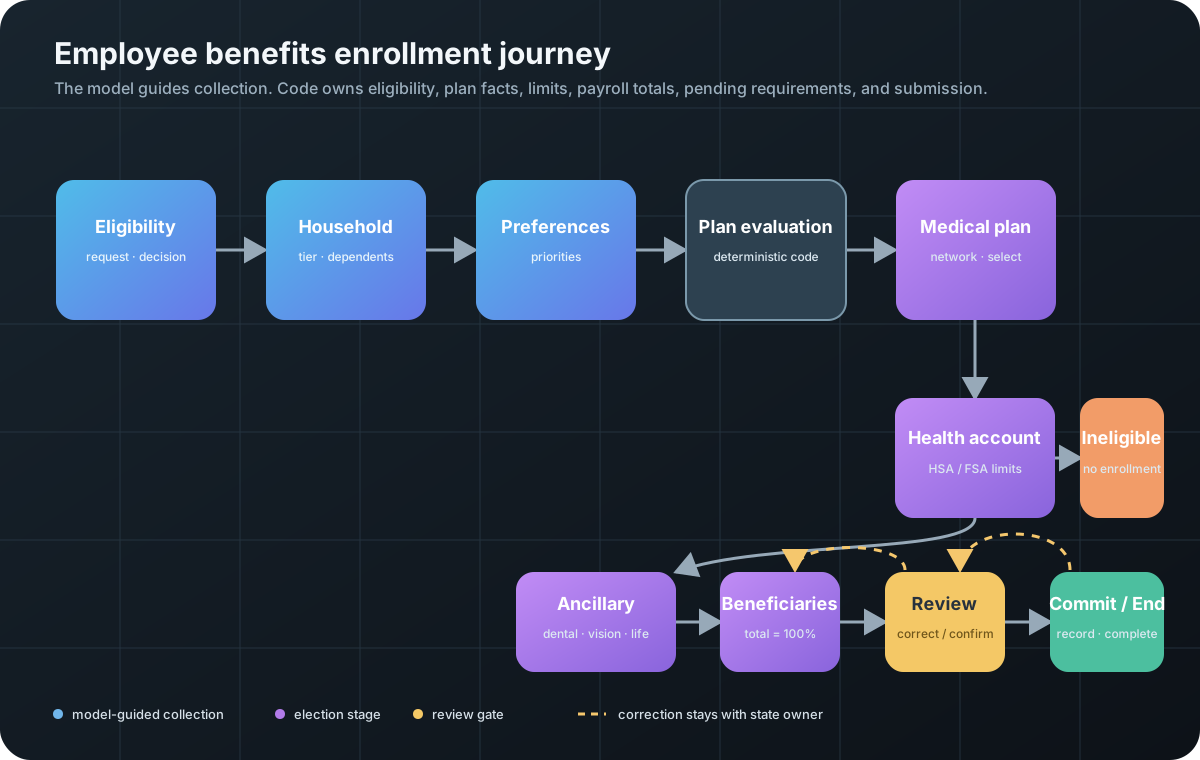
The normal scenario uses twenty-two user interactions. It includes exact medical-plan presentation, plan comparison, a provider-directory lookup, rejected and corrected HSA and dependent-care elections, dental and life explanations, a rejected 90% beneficiary allocation, a review-time HSA correction, evidence-of-insurability explanation, and explicit submission.
State ownership
| Step | Primary job | Durable state |
|---|---|---|
EligibilityStep |
Validate request and run employee/window policy | request, decision |
HouseholdStep |
Validate coverage tier and covered dependents | household |
PreferencesStep |
Record broad non-diagnostic plan priorities | preferences |
PlanEvaluationStep |
Calculate exact options and rule-based fit | evaluation |
MedicalPlanStep |
Present, compare, check network, select | selectedPlan |
HealthAccountStep |
Enforce HSA or FSA compatibility and limits | election, result |
AncillaryBenefitsStep |
Price dental, vision, life, and disability | election, quote |
BeneficiaryStep |
Require allocations totaling exactly 100% | election |
DependentCareStep |
Enforce eligible-dependent and annual limits | election, result |
EnrollmentReviewStep |
Render review, explain pending items, accept correction and confirmation | confirmedAt |
CommitEnrollmentStep |
Create the deterministic enrollment record | enrollmentRecord |
EnrollmentReviewStep does not maintain a second editable application object. A helper
reads the state owned by each preceding step. The only review-time correction writes a
validated contribution back to HealthAccountStep, then renders the application again.
Deterministic policy boundary
BenefitsPolicy contains a fictional employee directory, enrollment-window rules,
medical plan catalog, provider network, HSA and dependent-care limits, ancillary pricing,
evidence-of-insurability threshold, and enrollment-record calculation. Two LogicSteps
call that boundary without a model:
PlanEvaluationStepproduces exact medical options and a rule-based fit.CommitEnrollmentStepcreates the finalBEN-2027-...record only after explicit review confirmation.
Plan tables and comparisons use direct(...), so a model never authors payroll prices or
deductibles. Tool handlers reject unknown plan IDs, incompatible accounts, excessive
contributions, and beneficiary percentages that do not total 100.
Privacy and capability boundary
The flow collects only the fictional data needed for the demonstration. It explicitly
forbids Social Security numbers, bank or card details, diagnoses, medication names, and
evidence-of-insurability health details. A three-times supplemental-life election is
submitted with EVIDENCE_OF_INSURABILITY still pending; the assistant cannot mark that
coverage approved.
The catalog, tax limits, employee directory, and provider network are demo fixtures. A production implementation needs real eligibility and payroll integrations, authorization, auditing, approved plan documents, privacy controls, and jurisdiction-specific review.
Run the tests
EmployeeBenefitsFlow uses AppModule’s shared engine and application-owned
MongoDB/Cosmos client factories. See the
bootstrap lesson
and persistence guide.
Set USE_ENV=1 on the test command to retain the configured store; the default
test uses isolated SQLite.
From pico-demo, run the deterministic policy checks without provider calls:
The test loads provider credentials from .env; when they are absent, its live scenario is skipped.
With OPENAI_API_KEY and PICOFLOW_KEY, the same script runs all twenty-two turns,
semantically grades every response, then asserts the persisted medical plan, corrected HSA,
beneficiaries, dependent-care election, pending requirement, payroll total, and completed
session:
npm run test:employee-benefits-flow
Read the scenario beside the source when adapting the pattern. It is the compact acceptance contract for the intended user experience, while the deterministic tests remain the policy authority.
The seven lessons
- A twenty-two-turn live replay shows the captured conversation and its testable acceptance contract.
- Designing an enrollment journey maps the enrollment graph and each stage’s responsibility.
- Prompt files and bounded collection keeps the model focused on collection and explanation.
- Deterministic eligibility, plans, and limits puts factual decisions in policy code.
- Memory namespaces and expiry scopes continuity without letting one long prompt carry the entire case.
- Correct, review, and submit handles recoverable mistakes and a deliberate final commit.
- Exact plan tables and response fallback renders sensitive comparison facts from code when prose is not enough.
Next
Start with the twenty-two-turn live replay, then follow the lessons in order.