
InvoiceFlow tutorial
Track overview
InvoiceFlow is not a conversation. One HTTP request names a bundled invoice, the flow uploads it to the provider, extracts typed JSON, and returns it as an application/json response.
InvoiceFlow is the document-processing track. There is a user message in the
request body, but nothing is really being said: the work is driven by
server-supplied configuration and by the contents of a PNG or PDF. The whole
job finishes inside one POST /ai/run, and the response body is the extracted
invoice rather than a chat envelope.
The implementation lives in pico-demo/src/myflow/invoice-flow/, and its
end-to-end spec in pico-demo/test/invoice-flow/. Browse the
InvoiceFlow source on GitHub.
What InvoiceFlow is
A Flow subclass with three overrides:
configModel()declares the default model,google/gemini-2.5-flash, and the Flow-owned limit of three runner attempts.defineSteps()registers two steps.spawnSteps()implements batch mode, fanning the same extraction out over a list of files.
There is no initialStep() override, so NoToolStep — first in the array —
starts every session.
This is the only track whose flow default is not OpenAI. Both steps run on Google models, and the file-upload path in lesson 4 resolves its provider adapter from the active model name. Nothing about the Step contract changes; only the registered adapter and the shape of the attached file part do.
The graph
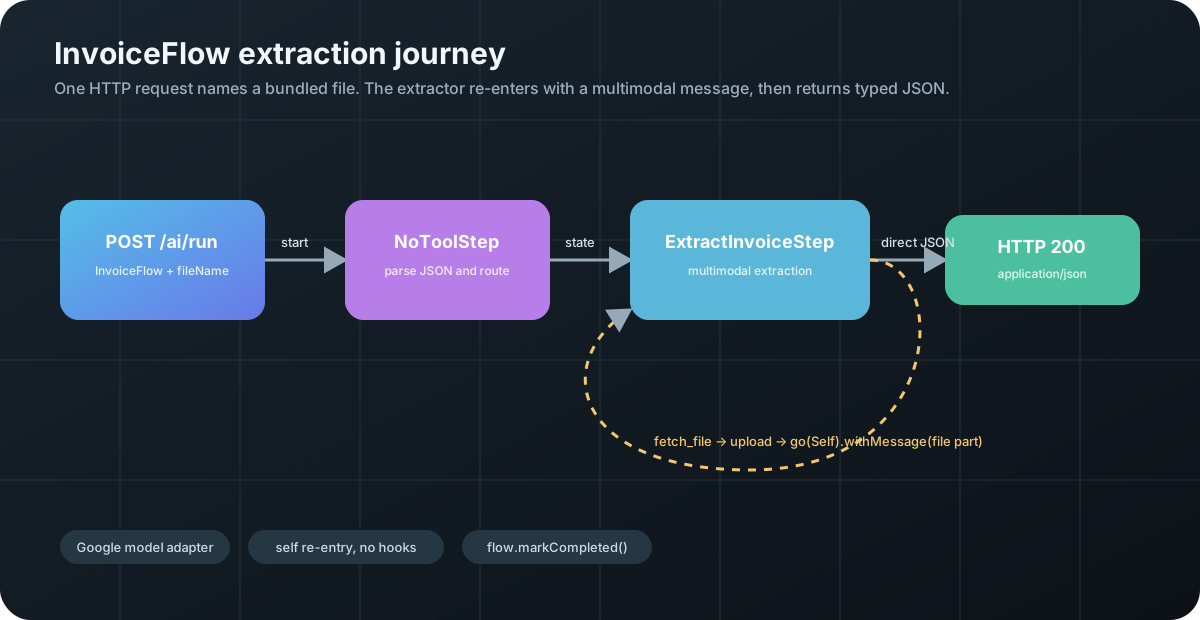
The self re-entry is the mechanism that makes multimodal extraction work in a
single step. fetch_file cannot return the file contents as tool feedback —
tool results are text. Instead it uploads the file, builds a human message
whose content array holds the provider’s file part, and re-enters the same step
with that message attached. The next model call sees the image.
Because flow.gotoByName short-circuits when the target is already the current
step, that re-entry fires no lifecycle hooks: no onExit, no onEnter, no
onCrossing.
The two registered steps
| Step | File | Memory namespace | Model override | What it demonstrates |
|---|---|---|---|---|
NoToolStep |
no-tool-step.ts |
class default, NoToolStep |
none, uses flow default google / gemini-2.5-flash |
Response-driven structured work: prompt the model for JSON, then let onResponse() parse, validate, save, and route without relying on a model-selected tool call |
ExtractInvoiceStep |
extract-invoice.ts |
invoice3 |
google / gemini-3.1-pro-preview, temperature: 0 |
File upload, a hand-built multimodal message, self re-entry, and a raw JSON response with a content type |
temperature: 0 on the extractor is deliberate. Extraction should be
reproducible; a value read off an invoice is not a creative decision.
Prompt and data files
| File | Responsibility |
|---|---|
prompt/nt-prompt.md |
NoToolStep’s output schema, a variable block, and a two-branch rule |
prompt/invoice-prompt.ts |
Composes the extraction persona with the example payload at class-load time |
prompt/invoice.md |
Persona, the two available tools, and the required call order |
prompt/invoice-example.json |
A complete example invoice that pins the output shape |
data/ACME.png |
The invoice the end-to-end spec extracts, with data/ACME.pdf as the same document in PDF form |
data/Evergreen.png |
The second invoice, used by batch mode, with data/Evergreen.pdf alongside it |
data/evergreen.json |
The expected extraction for the Evergreen invoice |
data/invoice-0-4.pdf |
A spare PDF fixture, not referenced by the flow or the spec |
What this track does and does not cover
| Feature | In InvoiceFlow? |
|---|---|
Multimodal file uploads via LLMFileManager |
yes |
direct() with a non-plain HTTP content type |
yes |
flow.markCompleted() without a terminal step |
yes |
Self re-entry with go(Self).withMessage(...) |
yes |
Batch fan-out with spawnSteps() + concurrentSteps() |
yes |
Response-driven structured work and routing from onResponse() with no tools |
yes |
| Memory compaction | no |
| Multi-tool batching, structured output, nested execution | no |
| A registered terminal step | no, it is commented out |
The five lessons
- The one-shot flow shape — a flow that runs to completion instead of waiting on user turns, and choosing a non-OpenAI default.
- A step with no tools —
response-driven structured work: prompt the model for JSON, then use
onResponse()as the application-controlled response handler instead of relying on a model-selected tool call. - Example-as-schema prompting — pinning an output shape with a full example payload, and when to use a real schema instead.
- Multimodal file uploads — uploading, attaching, and re-entering the step that asked for the file.
- Raw JSON and batch fan-out — content types through the controller, and running the same extraction over a list of files.
Running it
InvoiceFlow’s extraction requests use the same application-owned database
factories as the conversational flows. See the
bootstrap lesson
and persistence guide.
Set USE_ENV=1 on the test command to retain the configured store; the default
test uses isolated SQLite.
npm run start:dev
npm run test:invoice-flow
curl -i http://localhost:8000/ai/run \
  -H 'content-type: application/json' \
  -d '{
    "flowName":"InvoiceFlow",
    "message":"Extract the configured invoice into JSON.",
    "config":{"fileName":"data/ACME.png"}
  }'
A successful response has Content-Type: application/json, the extracted
invoice as its body, and a CHAT_SESSION_ID header. The spec asserts the
returned JSON against prompt/invoice-example.json and then checks that the
persisted ExtractInvoiceStep.state.json is deep-equal to the HTTP body.
The demo reads files that ship with the server. The filename travels from request config, through a prompt, through a model, and back into path.join — a path that lesson 4 examines in detail, because it is exploitable as written.
Next
Start with 1. The one-shot flow shape.